v0.2.0 Manage PHP 8.2–8.5 right inside the app

A Windows local server
that just works.

Apache, PHP, MySQL, and phpMyAdmin in one desktop app. Drop your project into the www folder, click Start All, and start coding.
v0.2.0 · Windows 10 / 11 · 64-bit · Free

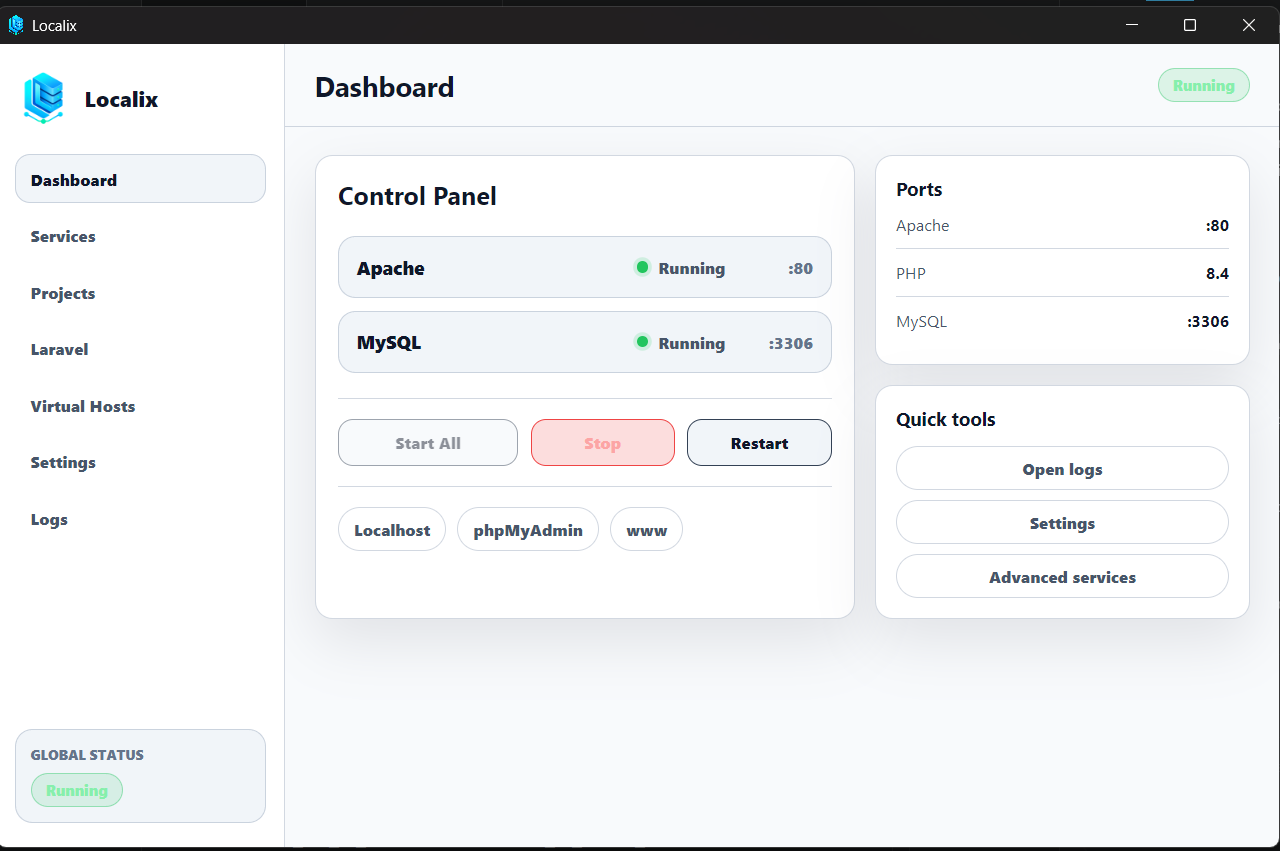
Localix dashboard: Apache and MySQL, PHP version picker, and shortcuts to Localhost, phpMyAdmin, and the www folder
Apache 2.4 PHP 8.2 – 8.5 MySQL 9.6 phpMyAdmin 5.2 Composer 2.9

Quick tour

Everything you need, in one window

Five pages, no confusing menus: Dashboard, Projects, PHP, Logs, and Settings.

One click for the whole server

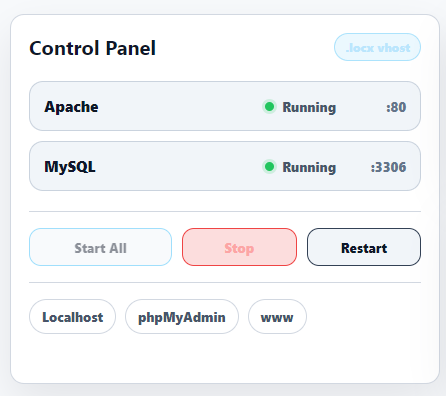
Start Apache and MySQL together or one at a time. Status and ports are always visible, no terminal needed.

  • Start, Stop, and Restart each service or all at once
  • Switch PHP versions from the dashboard or the tray menu
  • Shortcuts to Localhost, phpMyAdmin, and the www folder
Services panel: Apache on port 80 and MySQL on port 3306 with Start All, Stop All, and Restart All buttons

New in v0.2.0

Pick the PHP version each project needs

Install, update, and switch versions from the PHP page. Files come from the official PHP site and are checked with SHA-256 before use. If Apache fails to start, the previous version is restored automatically.

And also

Small things that make life easier

Extensions & php.ini as checkboxes

Toggle extensions and set memory limit, uploads, timezone, and OPcache. Changes are tested before they are applied.

Logs in one place

Read and clear the Localix, Apache, MySQL, and PHP logs from the Logs page.

Updates keep your data

Projects (www), databases (data), and settings (config) stay safe when you update Localix.

Check Ports

Port 80 taken by another app? Settings shows which ports are in use, and you can change the Apache and MySQL ports.

No Windows services

Apache and MySQL run as Localix processes, not system services. Nothing is left behind in Windows.

Installer or portable

Use the regular installer, or run the portable build from any folder, including a USB drive.

Coming from XAMPP?

Move to Localix in five minutes

The folder layout is similar. Only where projects live and how you manage the server change.

  1. Export your databasesIn XAMPP's phpMyAdmin, export your databases as .sql files.
  2. Copy your projectsMove folders from htdocs into the Localix www folder.
  3. Stop XAMPPStop XAMPP's Apache and MySQL so ports 80 and 3306 are free.
  4. Start All and importStart Localix, open phpMyAdmin, and import the .sql files.

Transparent

Why does Windows show a warning?

Localix is not signed with a paid certificate yet, so SmartScreen may show "Windows protected your PC". Click More info, then Run anyway.

Only download from GitHub Releases, and check the file against SHA256SUMS.txt.

FAQ

Common questions

Is Localix really free?

Yes. No subscription, no premium tier, no paid license.

Which Windows versions are supported?

Windows 10 and Windows 11, 64-bit. Both an installer and a portable build are available.

Can I use multiple PHP versions?

Yes. PHP 8.4 is included, and 8.2, 8.3, or 8.5 can be installed from the PHP page. One version is active at a time, and you can switch from the dashboard or the tray menu.

Port 80 is used by another app. What now?

Use Check Ports in Settings, then close that app or change the Apache port, for example to 8080.

What are the MySQL username and password?

Username root with an empty password. phpMyAdmin only opens from your own computer (localhost).

Ready to start coding?

Free, lightweight, and ready in two minutes.